

Observability Integrations
Prometheus Endpoint
Ubiq offers Enterprise customers a Prometheus endpoint that can be used to monitor availability status of Ubiq in your own observability platform powered by Prometheus. To do this:
- Navigate to the Integrations page
- Click on Prometheus under the SIEM Integrations header
- Enable the Prometheus endpoint
- You will be given a URL and a token. The token is used to securely identify your customer account to prevent Ubiq endpoints from being used by unauthorized consumers. Please keep this token and URL secure.
Event Streaming (SIEM Log Forwarding)
Enterprise customers can also enable Event streaming to push activity and usage events to your SIEM provider. Ubiq currently supports Splunk and Grafana Loki (below). To set up Splunk:
-
In your Splunk environment, set up a new collector and token to retrieve data from Ubiq (Splunk links for CLI or web instructions below)
-
Navigate to the Integrations page
-
Click on your SIEM provider (Splunk)
-
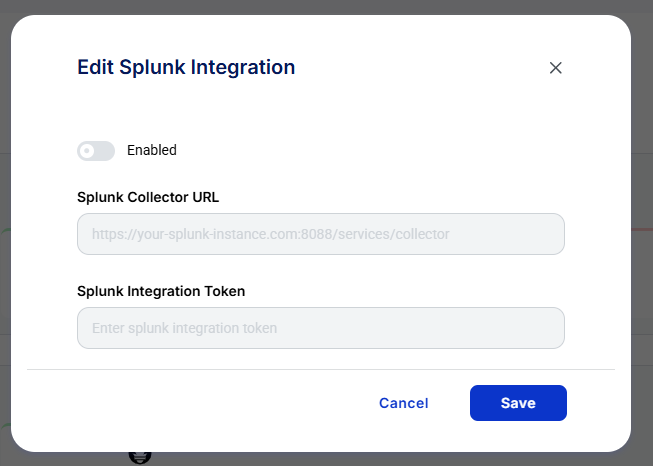
In the modal that pops up, enable the integration and then enter your Splunk collector URL and integration token
Grafana Loki
Enterprise customers running Grafana Loki can receive the same activity and usage events. Loki streaming is set up by Ubiq support rather than from the Integrations page. To enable it:
- Send Ubiq support your Loki push endpoint, for example
https://loki.example.com/loki/api/v1/push, and any stream labels you want added, for exampleenv: production. Every stream also carries the labelservice="ubiq". - Make sure your endpoint accepts pushes from Ubiq over HTTPS. Pushes don't carry credentials today, so allow Ubiq's traffic at the network layer, for example through an allowlist or a gateway in front of Loki. Ubiq support can help with the details.
- Once streaming is enabled, each event arrives as one JSON log line:
{"message_type":"usage","event":{"api_key":"...","action":"...","datasets":"...","count":1,"date":"..."}}message_type is activity for user and administrative actions, and usage for encryption and decryption usage. The event fields are the same ones sent to Splunk. For example, to query usage in Grafana:
{service="ubiq"} | json | message_type="usage"Updated 17 days ago